
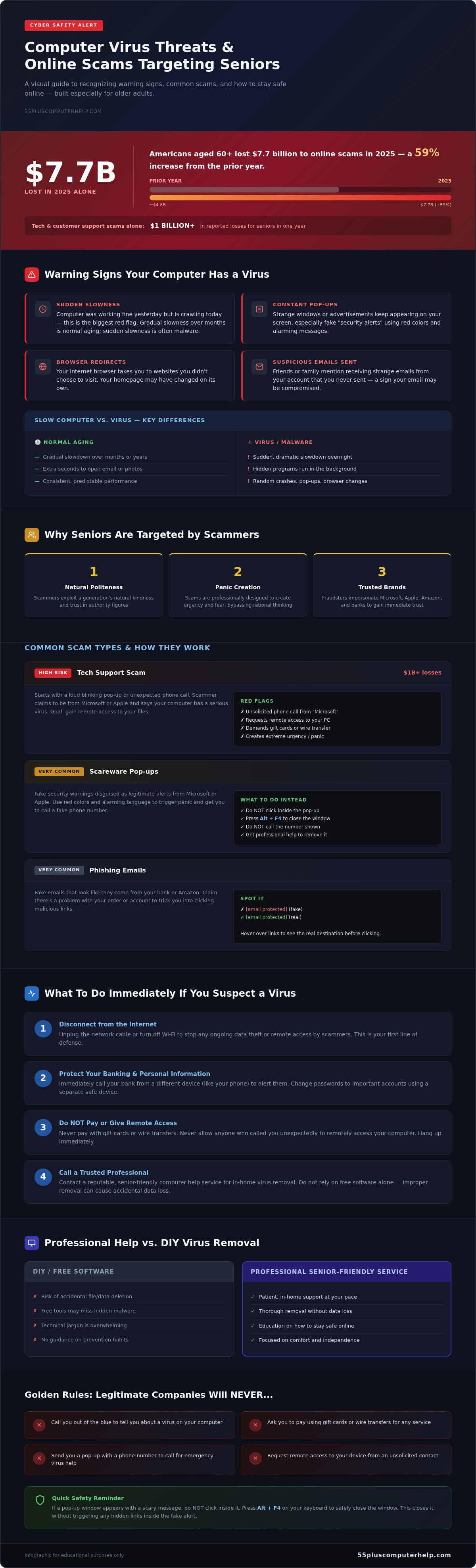
Did you know that Americans aged 60 and older lost a staggering $7.7 billion to online scams in 2025 alone? This sharp 59% increase shows why finding reliable virus removal for seniors denver services is more important than ever. It's completely natural to feel a sense of anxiety when your computer starts acting strange or showing scary pop-up messages. You might worry about losing your precious family photos or being tricked out of your hard-earned savings. Dealing with technical jargon and slow devices is frustrating. It's okay to feel overwhelmed by how fast technology changes.
We're here to help you regain your confidence and peace of mind. This guide provides a patient, step-by-step approach to help you stay safe online. You'll learn how to spot the warning signs of a virus, how to clear them away, and how to keep your personal information protected. We'll walk through the simple ways to identify common threats, the process of cleaning your device, and the best habits to ensure your computer stays fast and secure for years to come.
Key Takeaways
- Learn how to recognize the clear warning signs of an infection, such as sudden slow performance or persistent pop-up advertisements.
- Discover the two immediate actions you should take to protect your banking information and personal files if you suspect a security threat.
- Understand why scammers target older adults and how to identify a fake tech support call before you share any private details.
- Find out how professional virus removal for seniors denver offers a patient and in-home approach that focuses on your comfort and education.
- See why relying on free software alone can be risky and how specialized support helps you avoid accidental data loss during the cleaning process.
Common Signs Your Computer Has a Virus or Malware
It is completely normal to feel a bit worried when your computer starts acting differently. You might wonder if you did something wrong or if the machine is simply getting old. Most of the time, your computer is trying to tell you something. Recognizing these signs early can save you a lot of stress and protect your personal information. If you notice any of the following symptoms, it's a good idea to look into professional virus removal for seniors denver services.
- Your computer or laptop is running much slower than usual.
- Strange windows or advertisements keep popping up on your screen.
- Your internet browser takes you to websites you didn't intend to visit.
- Friends or family mention receiving unusual emails from your account.
Understanding the Difference Between a Slow Computer and a Virus
Computers naturally slow down as they age. This usually happens gradually over several months or years. You might notice that it takes an extra few seconds for your email to open or for a photo to load. A virus behaves differently. The biggest red flag is a sudden change in performance. If your computer was working perfectly yesterday but is crawling today, that's often a sign of malware.
Hidden programs often run in the background without your permission. These malicious programs eat up your computer's memory and processing power. This makes every task feel like a chore. While a simple tune-up can help an old machine, a virus requires a more thorough cleaning to get things back to normal.
Pop-ups and Fake Security Alerts
One of the most common tricks scammers use is called "scareware." This is a pop-up that looks like a serious security warning from a company like Microsoft or Apple. These alerts often use bright red colors or flashing lights to create a sense of panic. They might claim your computer is infected with dozens of viruses and tell you to call a phone number immediately for help.
Never call the phone number on these pop-ups. Legitimate companies will never ask you to call them through a random window on your screen. These are fake alerts designed to trick you into giving someone remote access to your files. If you see one of these windows, don't click anywhere inside the box. Instead, you can close it safely by pressing the Alt key and the F4 key on your keyboard at the same time. This closes the window without triggering any hidden links. Getting expert help with virus removal for seniors denver ensures these pesky traps are removed for good, giving you back your digital independence.
Why Seniors Are Targeted and Common Online Scams
Scammers often target older adults because they rely on a generation's natural kindness and politeness. In 2025, Americans aged 60 and older lost a reported $7.7 billion to these digital criminals. This was a 59% increase from the year before. It's vital to remember that falling for a trick doesn't mean you aren't tech-savvy. These scams are highly professional and designed to create panic. If you've been targeted, seeking virus removal for seniors denver is a proactive step toward taking your power back.
The Anatomy of a Tech Support Scam
A tech support scam often starts with a loud, blinking pop-up or an unexpected phone call. The person on the other end will claim to be from a trusted company like Microsoft. They might say they've detected a serious problem with your computer. This is a lie. Their goal is to gain your trust so you'll give them remote access to your machine. Once they're "inside" your computer, they can see your files and install malicious software. Tech and customer support scams alone caused over $1 billion in reported losses for seniors last year.
There are clear red flags to watch for. Legitimate companies like Apple or Microsoft will never call you out of the blue to tell you about a virus. They'll also never ask you to pay for services using gift cards or wire transfers. If someone asks for payment this way, hang up immediately. Our team provides patient support and virus removal to help you feel safe again without the pressure of these scams.
Identifying Phishing and Fraudulent Links
Phishing is a term for fake emails that try to "fish" for your private information. These messages often look like they come from your bank or a company like Amazon. They might say there's a problem with an order or your account. Before you click any buttons, look closely at the sender's email address. Scammers often use addresses that look almost right but have small errors, like "[email protected]" instead of "amazon.com."
You can also use the "hover" trick. Place your mouse arrow over a link or button without clicking it. A small box will appear showing the real website address. If that address looks like a jumble of random letters and numbers, don't click it. For more tips on managing your inbox safely, see our guide on Email Setup and Troubleshooting for Seniors. Staying safe is about learning these small habits one step at a time.
Please know that it's not your fault if a scammer tricks you. These criminals use artificial intelligence to create flawless emails and even deepfake voices that mimic family members. They spend all day practicing how to manipulate people's emotions. You aren't alone, and there's no reason to feel embarrassed. Taking action and getting professional virus removal for seniors denver is the best way to move forward and protect your digital life.
Professional Virus Removal vs. DIY Fixing: What You Need to Know
It's very common to feel like you should try to fix a computer issue on your own first. You might think that downloading a quick free program will solve the problem without any fuss. Don't risk your data on a guess. While basic tools can be helpful for minor issues, they often fall short when dealing with serious threats. Choosing professional virus removal for seniors denver ensures that your computer is truly clean and safe for your daily tasks.
The Risks of 'Free' Antivirus Software
Many free antivirus programs only look for the most common and well known threats. They often miss deeply hidden malware or "spyware" that stays quiet while it tracks your information. Some tools that claim to be free are actually clever viruses in disguise. These programs use "scareware" tactics to trick you into thinking your computer is in danger so you will pay for a fake solution. This often leads to more technical problems and more anxiety.
Professional tools are much more powerful and thorough than the versions you find online for free. They perform deep forensic cleaning to find every trace of malicious code hidden in your system. Trying to manually delete suspicious files yourself is risky. It can easily lead to accidental data loss if you remove a file your computer needs to start up. A professional knows exactly which files are dangerous and which ones are essential for your computer's health.
Why a Patient Approach Matters for Seniors
Technology should be a tool that helps you stay connected. It should not cause frustration. The biggest benefit of professional help is having a patient mentor right there with you. We don't just fix the machine and walk away. We take the time to explain the process in plain English without using confusing jargon. This helps you feel more empowered and confident the next time you browse the web. You can read more about these protective steps in our Virus and Malware Removal Guide.
In-home support makes the process much easier for you. You don't have to worry about disconnecting all those tangled cables or carrying a heavy computer to a repair shop. We come to your home where you are most comfortable. Professional removal includes several key steps:
- A full system scan using advanced forensic tools.
- The safe removal of hidden tracking software and spyware.
- Updates for your operating system to close security gaps.
- A check of your data backup to ensure your photos are safe.
This neighborly approach reduces stress and makes the whole experience more pleasant. We make sure your software is updated and your data is properly backed up. This transforms a stressful repair into a helpful lesson that keeps you safe and independent. Getting expert help with virus removal for seniors denver means you can get back to what matters most without the worry.
What to Do Immediately if You Suspect a Virus
Realizing your computer might have a virus is a scary moment. You might feel a rush of panic or worry about your private files. Take a deep breath. You can take control of the situation right now with a few simple steps. Acting quickly helps prevent further damage and keeps your information safe while you arrange for professional virus removal for seniors denver.
- Step 1: Disconnect your computer from the internet immediately.
- Step 2: Stop using the computer for any banking or sensitive shopping.
- Step 3: Do not type in any passwords or personal details.
- Step 4: Write down exactly what you see on your screen.
- Step 5: Call a trusted expert to perform a safe cleanup.
How to Safely Disconnect Your Device
The most important thing you can do is cut off the connection between your computer and the outside world. Most modern laptops have a small Wi-Fi icon in the bottom right corner of the screen. Click it and select "Disconnect" or "Turn off Wi-Fi." If you use a desktop computer with a physical wire, simply unplug that cable from the back of the machine. This prevents the virus from "talking" to the scammer or sending your files to a different location.
Sometimes a scammer's window might "freeze" your screen. You might feel like you've lost control of your mouse or keyboard. If this happens, don't panic. You can force the computer to turn off by holding down the physical power button on your machine for ten full seconds. This acts like an emergency brake. It stops any malicious activity instantly and gives you a moment to think clearly.
Recording Symptoms for Your Technician
Your technician is like a digital doctor. The more information you provide, the faster they can fix the problem. Use your smartphone to take a clear photo of any strange error messages or pop-up windows before you turn the computer off. These images are very helpful because they show the exact wording the scammer used. Note down when the trouble started and what you were doing at the time. These small details help your expert work more efficiently during the cleanup process.
Taking these steps puts you back in the driver's seat. Once your device is disconnected and you have your notes ready, it's time to get expert help. We offer specialized virus removal for seniors denver to ensure your computer is returned to a fast, clean, and safe state. Our patient approach focuses on your comfort and security every step of the way.
How Specialized Support Helps You Stay Safe and Independent
Dealing with a computer virus feels like an invasion of your private space. It is much more than just a technical glitch. It involves your family photos, your personal emails, and your sense of security. Our primary goal is to remove the virus and the heavy weight of fear that comes with it. When you look for virus removal for seniors denver, you deserve more than a quick fix. You deserve a patient mentor who values your comfort as much as the technical solution.
We understand that technology can be a source of frustration when it doesn't work correctly. This is why we focus on empowerment rather than just repair. We want you to feel in control of your digital life again. By providing a supportive and individualized experience, we transform a stressful situation into a moment of learning and accomplishment. You should never feel embarrassed about a tech issue. We are here to help you navigate these challenges with grace and self-assurance.
In-Home Support: Tech Help in Your Comfort Zone
We believe you learn best where you feel most at ease. Disconnecting your computer and carrying it to a cold, busy retail store is a hassle. It's also unnecessary. We offer onsite visits so you can stay right at your own desk. This allows us to see how you actually use your device in your daily life. It makes the teaching process much more effective and natural.
During a visit for virus removal for seniors denver, we do more than just clean the hard drive. We take a holistic look at your setup. Much like the comprehensive approach to physical wellness offered by Realigning Your Health in Centennial, we ensure every part of your digital environment is working in harmony. We check your printer connections and ensure your Wi-Fi security is strong. These small, extra steps ensure that your entire home network is a safe environment. Being in your own home makes it easier to ask questions and take notes at your own pace. This neighborly approach ensures you feel well-informed every step of the way.
Independence online comes from a place of understanding. We want to help you move from simply fixing a problem to truly mastering your device. We provide personalized lessons that show you how to spot future scams before they happen. This proactive education is the best defense against the rising tide of online fraud. For organizations and businesses that require professional-grade protection, M.I.S. Support, Inc. offers comprehensive managed IT and compliance services to keep larger systems safe. You will learn the specific red flags to watch for in your own inbox and browser.
Knowing exactly who to call for any tech question brings immense peace of mind. Whether you need an onsite visit or a quick check-up via remote support, we are your local experts. This reliable partnership allows you to stay connected with your family and friends without the constant worry of being scammed. Technology should be a bridge to the people you love. With the right support, you can enjoy all the benefits of the digital world while staying perfectly safe and independent.
Staying safe online doesn't have to be a source of stress. By recognizing early warning signs like sudden slow speeds and acting quickly to disconnect your device, you protect your most precious files and photos. Remember that you don't have to face these technical challenges alone. Professional virus removal for seniors denver offers a path back to a fast, clean computer without the frustration of complicated jargon or risky DIY attempts.
We believe technology should empower you to stay connected with the people you love. Our team has over 10 years of experience providing onsite support in the comfort of your own home. We provide patient mentors who speak your language and value your independence. You can move forward with confidence knowing your digital life is secure and well-managed. Get Patient, In-Home Virus Removal Support Today and enjoy the peace of mind you deserve. You've got this, and we're here to help every step of the way.
Frequently Asked Questions
How can I tell if my computer has a virus or if it is just slow?
Sudden changes are the key indicator of a virus. While aging hardware slows down over several years, a virus causes immediate performance drops or frequent crashes. You might also see new icons you didn't install or settings that changed without your permission. A slow computer is usually consistent, but an infected one acts erratically and often displays aggressive advertisements that weren't there before.
Is it safe to use my computer for banking if I suspect a virus?
No, you should stop all financial activities immediately if you suspect an infection. Some viruses use "keyloggers" to record every button you press, including your bank passwords and account numbers. It's best to use a different, clean device or wait until after professional virus removal for seniors denver to ensure your private data remains protected. Safety first is always the best policy for your savings.
Can a virus really be removed without losing my personal photos?
Yes, in most cases, your precious photos and documents can be saved. Professional cleaning focuses on deleting the malicious software code while keeping your personal files untouched. We prioritize data safety and can often back up your pictures before the deep cleaning begins. This ensures that your memories are preserved even while the digital germs are being scrubbed away from your system.
What should I do if a pop-up tells me to call a support number?
You should never call the number provided in a pop-up alert. These are almost always "scareware" scams designed to trick you into paying for fake repairs. Legitimate companies like Microsoft or Apple don't send messages with phone numbers to call. Simply close the window or turn off your computer. If the pop-up won't go away, it's time to seek expert help for a thorough cleaning.
Do Apple computers and iPads get viruses too?
Yes, Apple devices aren't immune to security threats or malicious software. While they have strong built-in protections, scammers still target Mac and iPad users with phishing links and fake security warnings. It's a common myth that these devices are perfectly safe. Keeping your software updated is essential for any device you own, regardless of the brand name or the type of operating system it uses.
Why do I need professional help instead of just running a free scan?
Free scans often miss deeply embedded threats that hide in the background of your system. Professional virus removal for seniors denver involves forensic tools that go beyond surface-level checks. An expert also looks for leftovers that free software might leave behind, which could allow the virus to return later. Plus, a professional can explain what happened so you feel more confident and empowered in the future.
Will a virus removal service also help me prevent future infections?
Absolutely, a good service includes a lesson on how to stay safe moving forward. We don't just fix the problem; we show you the specific red flags to watch for in your email and on the web. This educational approach helps you master your device. We'll also ensure your security settings are turned on and your software is current, creating a stronger shield for your computer.
Can you help me remotely or do you need to come to my home?
We offer both onsite visits and remote assistance to fit your comfort level. In-home support is often best for a first visit because it allows us to check your Wi-Fi and printer setup too. If you have a minor worry or a quick question later on, remote support is a convenient and fast option. We always work at your pace to make sure you feel supported and secure.


