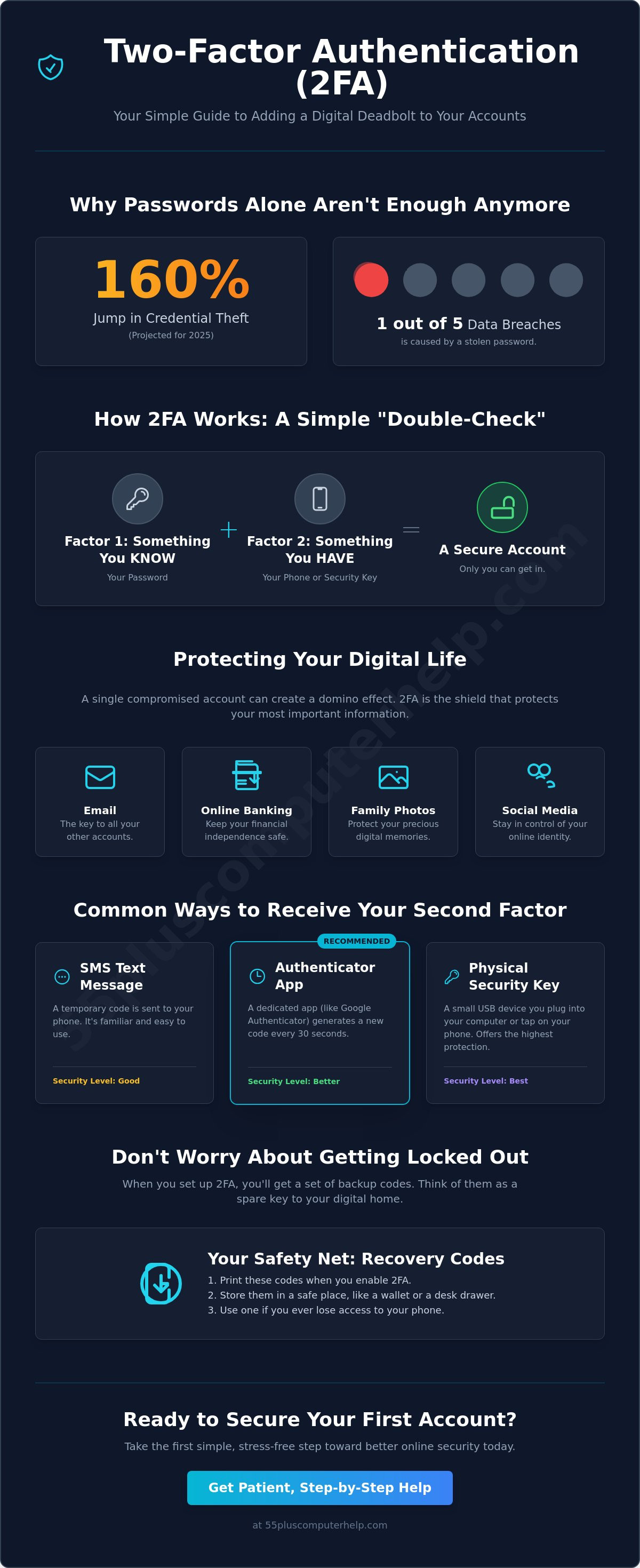
Did you know that credential theft jumped by 160% in 2025, causing one out of every five reported data breaches? It's a startling figure, especially when you already feel the frustration of remembering dozens of different passwords. You might be asking yourself, what is two-factor authentication and why do i need it? While it sounds like a complex technical term, it's actually a simple, supportive way to make sure you're the only person who can access your most important accounts.
We know that learning new digital habits can feel intimidating. The fear of being locked out of your own email or bank account is very real. This guide will help you understand how this extra layer of security works in plain, everyday language. You'll learn how to set up these protections safely so you can stop worrying about hackers and start feeling secure. We'll walk through the different tools available, from simple apps to the latest phishing-resistant methods recommended by experts in 2026. By the end, you'll have the confidence to keep your private information truly private.
Key Takeaways
- Think of two-factor authentication as a digital deadbolt that adds a simple, extra layer of security to your online front door.
- Understand what is two-factor authentication and why do i need it to keep your private family photos and bank accounts safe from outsiders.
- Explore the most common ways to receive security codes, from familiar text messages to easy-to-use smartphone apps.
- Learn how backup recovery codes act as a safety net so you always have access to your information, even if you lose your phone.
- Discover a gentle, step-by-step approach to securing your first account today without any technical stress.
What Is Two-Factor Authentication (2FA)?
When you hear the term two-factor authentication, it might sound like something meant for a computer scientist. In reality, it is just a simple "double-check" for your identity. Think of it as a second layer of protection for your digital life. You are likely already asking yourself, what is two-factor authentication and why do i need it? The answer is quite simple. It is a way to make sure that even if someone finds your password, they still cannot get into your private accounts.
Imagine your home has a standard lock on the door handle. That lock is like your password. Now, imagine you also have a heavy-duty deadbolt installed above it. To get inside, you need both the handle key and the deadbolt key. Two-factor authentication works the same way. It requires two different pieces of evidence to prove you are who you say you are. One piece is usually something you know, like a password. The second piece is something you have, like your smartphone.
You have probably used this system for years without even realizing it. Every time you visit an ATM, you use two factors to get your cash. You have your physical bank card, which is something you possess. You also have your PIN, which is a secret number you know. Without both pieces, the machine will not give you any money. This article will help you understand how to bring that same level of comfort and security to your email and social media accounts.
The Simple "Double-Check" System
The process follows a very predictable sequence. First, you enter your username and password as you always have. Once the computer accepts those, it asks for the second step. This step usually involves a short code sent to your phone or a simple tap on a screen. Because this second step happens on a device you physically hold in your hand, it is very difficult for a stranger in another city to bypass it. You may sometimes hear professionals refer to this as Multi-factor authentication (MFA). For most of us at home, these terms mean exactly the same thing. They both represent a partnership between you and your technology to keep you safe.
Why a Password Alone Is Not Enough in 2026
In the past, a long password was often enough to keep people out. However, modern hackers now use powerful software that can guess thousands of common passwords in just a few seconds. Even if you choose a very clever password, it can still be stolen. Large companies often suffer from data breaches where lists of usernames and passwords are leaked onto the internet. If your password is on one of those lists, a hacker can log in as you from anywhere in the world. This is exactly why you need 2FA. It acts as a safety net. Even if a thief steals your password, they will be stopped at the second lock because they do not have your physical phone.
Why You Need 2FA to Protect Your Digital Life
Your online world is more than just a collection of websites. It is where you store precious family photos, keep in touch with old friends, and manage your hard-earned savings. Because so much of our lives happens online now, it is natural to ask, What Is Two-Factor Authentication (2FA)? and why do i need it? The answer lies in protecting your independence and your peace of mind.
When you add this extra step, you are securing your financial independence. Online banking is convenient, but it requires a strong shield. Without that second lock, a stranger could potentially access your accounts and move money without you ever knowing. By using 2FA, you ensure that your bank always checks with you before allowing a login. This simple act prevents identity theft, which can happen when someone uses your personal details to open credit cards in your name.
Beyond money, there is an emotional side to security. Think about the years of emails you have saved or the photos of your grandkids on social media. Losing access to these digital memories can be heartbreaking. Setting up 2FA means you won't have to live with the constant anxiety of a "hacker scare." You can stop worrying about changing your passwords every time you hear about a data breach on the news. If you ever feel like your computer is acting strange, our team can help with virus and malware removal to get things back on track.
The Impact of a Compromised Account
A single stolen password can create a domino effect. Most people use their primary email to reset passwords for other sites. If a hacker gets into your email, they can use the "forgot password" link on your bank or social media pages to take over everything. This creates a mountain of stress and can take weeks to untangle. Protecting your email is the first step in stopping this chain reaction before it starts. If you need help getting your inbox organized and safe, we can assist with email setup and troubleshooting to give you a fresh start.
Accounts That Need 2FA Immediately
You don't have to secure everything at once. Focus on the accounts that would cause the most trouble if they were lost. Your primary email (like Gmail, Yahoo, or Outlook) should be your top priority. Next, look at your social media profiles. These are often used to stay in touch with grandkids, and you want to keep those connections safe. Finally, ensure your health portals and insurance websites are locked down. These sites contain sensitive medical data that deserves an extra layer of care.
The Three Most Common Ways 2FA Works
Understanding how to use these tools is the best way to feel comfortable with them. You don't need to be a computer expert to use these methods. Each one offers a different way to prove you are the real owner of your account. When people ask, what is two-factor authentication and why do i need it, they are often surprised by how many simple options exist. You can choose the method that fits your daily routine and your comfort level with technology.
Most of these systems rely on a device you already own, like your smartphone or tablet. For a deeper look at the technical details, you can explore What is 2FA (Two-Factor Authentication)? from the experts at IBM. For our purposes, we will focus on the three ways you are most likely to encounter this security step in your everyday life.
Receiving Codes via Text or Email
This is the most familiar method for most people because it works just like receiving a regular message from a friend. When you try to log in, the website sends a six-digit code to your phone or your email inbox. You simply type that code into the box on your screen. It is a wonderful "starter" method because you don't have to download any new programs or learn a new system. The only downside is that you need a reliable cell signal or an internet connection to receive the code. If you are in a basement or a remote area with no service, you might have to wait a moment for the message to arrive.
Using an Authenticator App
If you want a method that works even without a cell signal, an authenticator app is a great choice. These are small, free programs you can install on your smartphone, such as Google Authenticator or Microsoft Authenticator. Instead of waiting for a text message, you just open the app. It will show a code that changes every thirty seconds. These apps are very private and do not track your location or read your personal messages. They simply act as a digital code generator that stays right in your pocket. This is one of the most reliable ways to answer the question of what is two-factor authentication and why do i need it for your most sensitive accounts.
Biometrics: Your Face or Fingerprint
Many modern smartphones and tablets now use "biometrics" to keep things simple. This is just a fancy word for using your fingerprint or your face to unlock an account. It is often the fastest way to log in because you don't have to type anything at all. You might worry about where this personal information goes, but your device is designed to keep that data very safe. Your fingerprint or face scan stays on your physical phone; it is never sent out across the internet. Once you set this up, proving your identity becomes as easy as looking at your screen or touching a button.
Finally, some people prefer a physical security key. This is a small device that looks like a USB thumb drive. You plug it into your computer or tap it against your phone to unlock your accounts. It acts like a real-world key for your digital front door. While less common for home users, it is a very powerful option for those who want the highest level of protection.
Common Concerns: Will I Get Locked Out?
The most common concern we hear from our neighbors is the fear of being locked out of their own accounts. It is a very normal thing to worry about. You might wonder what happens if your smartphone stops working or if you lose it while you are away from home. Many people hesitate to add extra security because they don't want to lose access to their own photos and messages. However, once you understand what is two-factor authentication and why do i need it, you will see that these systems are built with safety nets specifically for the rightful owner.
These protections are designed to stop strangers, not you. Think of it like a bank vault. The bank wants to make sure you can always get to your money, even if you lose your debit card. There are always ways to prove who you are if you follow a few simple steps during the initial setup. By preparing a little bit ahead of time, you can enjoy the security of 2FA without any of the anxiety of being stuck outside your digital life.
The "Spare Key" Strategy
When you first turn on 2FA, most websites will provide you with a list of "Recovery Codes" or "Backup Codes." These are like a set of physical spare keys for your digital house. If you ever lose your phone or change your number, you can type in one of these codes to get back into your account immediately. We recommend printing these codes out on a piece of paper. Keep them in a safe, physical place with your other important documents, like your birth certificate or insurance papers. If you run into trouble with your inbox during this process, we can help with email setup and troubleshooting to ensure your primary gateway is secure and accessible.
Another great safety net is to add a trusted secondary person to your account settings. Some services allow you to list a "Recovery Contact," such as a child, a spouse, or a very close friend. If you ever get stuck, the website can send a special verification code to their device to help you regain access. This creates a circle of trust that keeps your information safe from hackers while giving you a reliable way back home.
Updating Your 2FA When You Get a New Phone
Getting a new phone is exciting, but it requires one small extra step to keep your security active. You should update your 2FA settings before you give away, sell, or trade in your old device. A helpful tip is to have two different methods enabled at the same time. For example, you could have codes sent to your phone number and also use an authenticator app. This way, if one method is unavailable during the switch, the other is ready to go. If you have recently purchased a new device and feel unsure about the setup, we offer patient smartphone and tablet training to help you move your security settings over safely and correctly.
Moving your security to a new device is simple if you follow this checklist:
- Log into your most important accounts on a computer while you still have your old phone.
- Go to the security settings and select the option to "add a new device."
- Follow the prompts to link your new smartphone.
- Wait until you are sure the new phone receives codes before erasing the old one.
How to Get Started with 2FA Without the Stress
The first step is often the most difficult, but you don't have to secure every single account in one afternoon. Now that you understand what is two-factor authentication and why do i need it, you can take a slow and steady approach. We suggest starting with just one account. Your primary email is the best place to begin because it is the gateway to your other online services. Protecting your email provides the biggest boost to your safety with the least amount of work.
To start, log into your email on your computer or tablet. Look for the settings menu, which is often represented by a small gear icon or your profile picture. Inside that menu, search for a tab labeled "Security" or "Privacy." You will see an option for "Two-Step Verification" or "Two-Factor Authentication." Once you click it, the website will walk you through the process with simple prompts. It will ask you to link your phone number or an app. After you finish the setup, test it by logging out and logging back in. Seeing that second step work for the first time will give you a great sense of relief.
A Low-Pressure Way to Practice
If you feel a bit of anxiety about changing your settings, try a low-pressure practice run. Pick an account that doesn't feel "high stakes," such as a social media profile or a news website you enjoy. This allows you to learn the rhythm of the system without feeling like your financial life is on the line. Read each screen slowly and carefully. There is no timer and no need to rush. It is completely normal to ask for a bit of help during your first setup. Learning what is two-factor authentication and why do i need it is the first step toward a worry-free digital life. Taking your time ensures that you feel confident and in control of your digital space.
How 55 Plus Computer Help LLC Can Assist You
We believe that technology should be a source of connection, not a source of stress. Our team at 55 Plus Computer Help LLC is here to act as your patient mentors through this entire process. We offer one-on-one training to help you set up 2FA on all your important accounts, from your bank to your health portals. We don't just "fix" things; we teach you how to use them so you feel empowered and independent. We can also help you organize and secure your recovery codes so you never have to worry about being locked out of your information.
Our goal at 55 Plus Computer Help LLC is to make sure you feel entirely comfortable with your devices every single day. We provide a calm and supportive environment where no question is too small. If you would like a helping hand to get your security started, you can Book a personalized technology training session to secure your digital world. We look forward to helping you find peace of mind and total confidence in your online safety.
Secure Your Digital Home Today
You now have the tools to turn a complex idea into a personal shield for your digital life. By adding this extra step, you secure your bank accounts and your most precious digital memories. We have answered what is two-factor authentication and why do i need it to help you see that modern safety can be simple and manageable. You can choose the method that fits your daily routine best, knowing that your information is finally locked tight.
If you still feel a bit of anxiety about these settings, you don't have to navigate this journey alone. The team at 55 Plus Computer Help LLC has over 10 years of experience helping seniors build their technical confidence. We are patient mentors who skip the jargon to focus entirely on your comfort and independence. Our personalized sessions are tailored to your unique pace, whether we meet in your home or work together remotely. Get Patient, Expert Help Setting Up Your Security at 55 Plus Computer Help LLC and protect your digital world today. You deserve to feel secure and empowered every time you go online.
Frequently Asked Questions
Is two-factor authentication mandatory for all my accounts?
No, it is usually optional for your personal accounts. However, some financial and healthcare websites now require it for your safety. For instance, the 2026 HIPAA Security Rule updates now mandate this protection for systems that handle electronic medical records. Most social media and email providers still give you the choice. We suggest turning it on for your most important accounts to ensure your private details remain safe.
Does it cost money to use two-factor authentication?
No, it is generally free for individual users. Popular apps like Google Authenticator or Microsoft Authenticator are free to download and use. While businesses might pay for professional versions, you should not expect to pay a fee to secure your personal email. Understanding what is two-factor authentication and why do i need it helps you see that this is an affordable way to add a strong layer of protection to your digital life.
What if I do not have a smartphone or do not want to use one?
You can still use these security features without a smartphone. Many services allow you to receive codes on a traditional landline phone through an automated voice call. You can also use a physical security key that plugs into your computer's USB port. These options ensure that everyone can stay protected, regardless of the type of phone they choose to carry or their comfort level with mobile apps.
Will I have to enter a code every single time I check my email?
No, most websites allow you to "trust" your home computer or tablet. Once you enter the code the first time, the site will remember your device for several weeks or even months. You will usually only need to enter a new code if you log in from a different computer or if you clear your internet history. This keeps your daily routine fast and simple while still keeping hackers away from your information.
Is getting a code via text message safe enough for my bank?
It is much safer than using a password alone, but there are even stronger options available in 2026. While text messages are a great starting point, some experts now suggest using authenticator apps for high-security accounts like banking. This is because sophisticated hackers can sometimes intercept text messages. If your bank offers an app-based option, it provides a more robust shield for your hard-earned savings and personal financial data.
What should I do if I receive a 2FA code that I did not request?
Do not share the code with anyone and change your password immediately. If you receive a code unexpectedly, it means someone else has successfully entered your password and is trying to get past the second lock. The security system did its job by stopping them in their tracks. By changing your password right away, you lock the digital door before they can try to guess your information again.
Can 2FA protect me from all types of online scams?
No, it primarily stops people from logging into your accounts without your permission. While it is excellent at preventing unauthorized access, it cannot protect you from "phishing" scams. This is where a scammer tricks you into sending money or giving away details voluntarily. You still need to be cautious about suspicious links and strange phone calls. It is just one part of a complete safety plan for your computer.
How do I turn off 2FA if I find it too difficult to use?
You can turn it off in the same "Security" or "Privacy" menu where you first enabled it. Simply look for the 2FA or Two-Step Verification setting and select "Turn Off" or "Disable." We recommend keeping it on for your primary email, but you are always in control of your own settings. If you still have questions about what is two-factor authentication and why do i need it, a patient mentor can help you find a simpler method.


