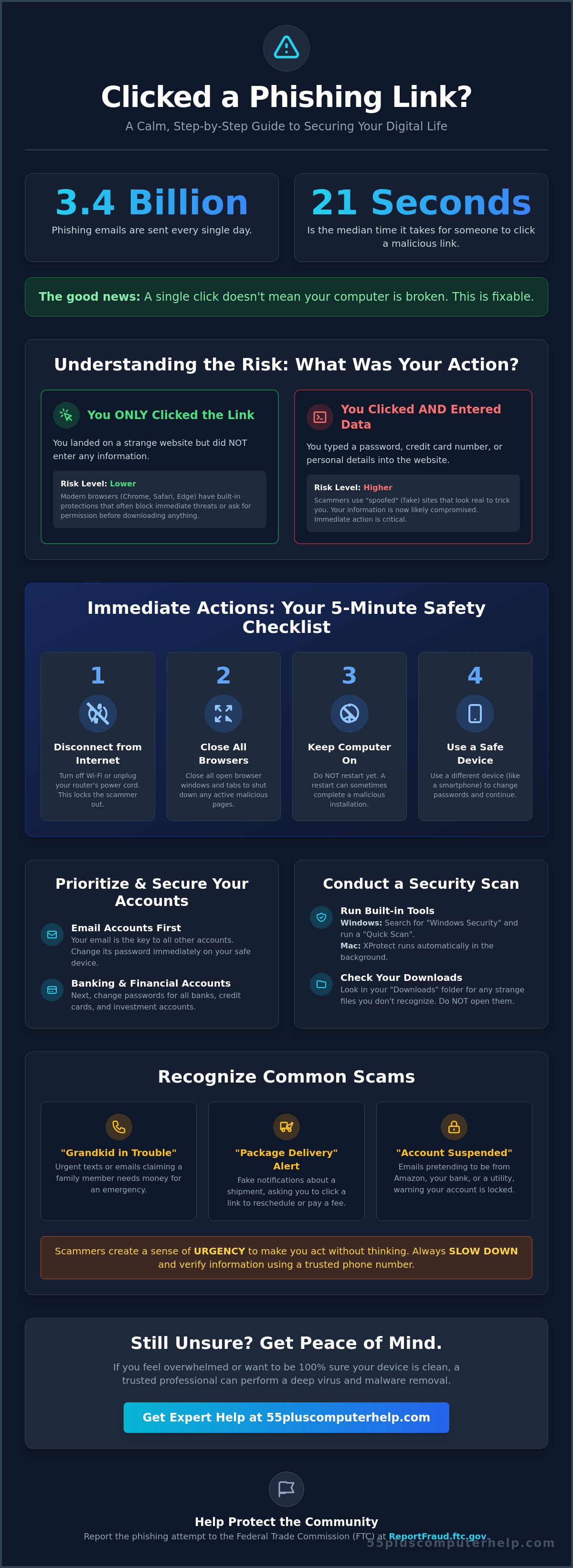
Did you know that an average of 3.4 billion phishing emails are sent every single day? It only takes a split second to make a mistake. In fact, the median time for a person to click a suspicious link is just 21 seconds. If you are currently wondering what to do if you clicked on a phishing link, please take a deep breath and know that you aren't alone. You haven't "broken" your computer, and this situation is entirely fixable.
It's completely normal to feel a sudden wave of anxiety about your money or your identity. We understand how overwhelming technical jargon can feel when you just want to know your information is safe. This article provides a calm, step-by-step checklist designed to help you protect your personal details and regain your peace of mind. We'll show you exactly how to secure your accounts, check for viruses, and report the incident to the right authorities. By the end of this guide, you'll have a clear path forward and the confidence that your digital life is secure once again.
Key Takeaways
- Learn the difference between simply clicking a link and sharing your data so you can stay calm and take control.
- Discover the immediate 5-minute safety steps for what to do if you clicked on a phishing link to disconnect from potential threats.
- Prioritize your security by protecting your email and banking accounts first with a clear and methodical plan.
- Know how to monitor your finances for small warning signs and which official departments can help you report the incident.
- Understand the peace of mind that comes from having a trusted professional perform virus and malware removal to ensure your device is truly clean.
Understanding the Risk: What Happens When You Click?
Phishing is a fancy word for a digital trick. Scammers send emails or texts that look official to try and steal your private information. If you find yourself wondering what to do if you clicked on a phishing link, the most important thing to do is stay calm. A single click is usually just the first step in a scammer's plan. They are like persistent telemarketers; they need you to stay on the line to finish their pitch. They are hoping you will take a second or third step, like giving them a credit card number or a password.
Many people worry that their computer is ruined the moment they touch a link. Thankfully, modern web browsers like Google Chrome, Safari, and Microsoft Edge have strong safety features. These programs are designed to block immediate, hidden downloads. They will almost always ask for your permission before any new software is added to your device. Understanding what phishing is helps you see that these messages are just bait. If you don't bite by providing more information, you are already ahead of the game.
Did You Just Click, or Did You Type?
There is a big difference between landing on a strange website and typing your password into it. If you only clicked the link but didn't enter any details, your risk is much lower. Scammers often use "spoofed" websites, which are fake pages designed to look exactly like your real bank or Amazon account. These sites are like digital costumes; they look familiar to make you feel safe enough to type in your secrets. A malicious download is simply a piece of harmful software that tries to install itself on your computer without your permission. If you didn't click "Allow" or "Run" on any pop-up boxes, your computer is likely still secure.
Common Scams Seniors Should Recognize
Scammers often target seniors because they rely on your patience and your natural desire to be helpful. They might send a "Grandkid in Trouble" text, claiming a family member needs money for an urgent emergency. You might also see "Package Delivery" alerts or fake emails saying your Amazon account is suspended. These messages create a sense of false urgency to make you act before you think. Knowing what to do if you clicked on a phishing link starts with recognizing these patterns. Scammers want to rush you, but you always have the right to slow down and verify the story through a trusted phone number.
Immediate Actions: Your 5-Minute Safety Checklist
Once you realize you've clicked a suspicious link, the clock starts. Don't panic. Following a few simple steps can stop a scammer in their tracks. Knowing what to do if you clicked on a phishing link starts with cutting off the intruder's path into your digital life. You can handle this quickly and effectively with these four steps.
First, disconnect your device from the internet. This is the most important move you can make. Second, close all your open browser windows and tabs. Do this immediately to prevent any fake websites from staying active. Third, keep your computer powered on; don't restart it just yet. Sometimes a restart can allow a hidden program to finish installing itself. Finally, pick up a different, safe device like your smartphone or a separate tablet to handle the rest of your security tasks.
How to Disconnect Safely
Disconnecting from the internet stops a scammer from "talking" to your computer. If you're on a laptop or tablet, look for the Wi-Fi symbol. It usually looks like a small fan or a series of curved lines. Click it and select "Turn Wi-Fi Off" or "Disconnect." If these menus feel confusing, there is a physical way to do it. You can simply walk over to your internet box, also called a router, and pull the power cord out of the wall. This instantly cuts the connection for every device in the house, giving you a safe environment to work in. Once the connection is dead, the scammer is locked out.
Conducting a Basic Security Scan
After you've cut the connection, you should check for any unwanted guests. Your computer has built-in tools to help. On a Windows computer, search for "Windows Security" and click "Quick Scan." On a Mac, you can use the built-in XProtect feature which works quietly in the background. It's also a good idea to open your "Downloads" folder. Look for any files you don't recognize, especially those with names that look like a jumble of letters and numbers. If you see something suspicious, don't open it.
If you feel unsure about what you're seeing, you might need professional virus and malware removal. A patient expert can look deep into your system to ensure everything is truly gone. While you're working through this, remember to report the phishing attempt to the FTC. This helps protect others from falling for the same trick. Since 83% of phishing sites now target mobile devices, our team offers smartphone and tablet training to help you recognize these threats before you click.
Securing Your Accounts and Personal Information
After you have secured your physical device, it's time to protect your digital identity. Think of your online accounts like the different rooms in your house. Your email account is the front door key. If a scammer gets into your email, they can reset the passwords for your bank, your social media, and your shopping accounts. When you are looking for what to do if you clicked on a phishing link, changing your email password should always be your very first priority. Once that door is locked, you can move on to your primary bank and credit card accounts.
Security experts often suggest using long passphrases instead of short, complex passwords. A passphrase is a string of simple words that are easy for you to remember but hard for a computer to guess. For example, "BluebirdsSingInTheSpring" is much stronger than a short word with a few numbers. This approach gives you more control without the headache of memorizing jumbled characters. For more detailed advice on keeping your digital life safe, you can review the FTC's guide on phishing scams. They offer excellent resources for anyone who wants to stay one step ahead of digital thieves.
The 'Golden Rule' of Password Changes
The most important rule in digital safety is to never use the same password twice. If a scammer finds the password to one account, they will immediately try it on every other website they can find. Using unique passwords keeps a single mistake from turning into a total loss. Many of our clients find the physical notebook method very helpful. Writing your passwords down in a dedicated book kept in a safe place at home is a great way to stay organized. Hackers cannot touch a piece of paper in your desk drawer. If you need help getting your accounts organized, our guide on email setup and troubleshooting can help you get back on track.
What is Multi-Factor Authentication (MFA)?
Multi-Factor Authentication, or MFA, acts like a second lock on your door. When you turn this on, the website will send a secret code to your phone via text message whenever you try to log in. You enter your password first, and then you enter the code from your phone. This is the best defense you have. Even if a scammer manages to steal your password, they still cannot get into your account because they don't have your physical phone. Most banks and email providers offer this feature in their "Security" or "Settings" menus. Taking a few minutes to set this up provides a massive boost to your personal safety and peace of mind.
Monitoring and Reporting: The Next 24 Hours
After you have secured your devices and updated your passwords, the next 24 hours are about careful observation. You have already taken the most urgent steps to protect yourself. Now, you should keep a close eye on your financial health to ensure no one is using your information. If you are still feeling anxious about what to do if you clicked on a phishing link, remember that being watchful is a powerful way to stay in control. Scammers often wait a short while before they try to use any data they might have collected.
Vigilance doesn't have to be stressful. It simply means checking in on your accounts once or twice a day for a little while. Most banks have very helpful fraud departments that are trained to deal with these exact situations. They would much rather you call them with a concern than wait until a problem grows. You are doing the right thing by staying alert and moving methodically through your safety checklist.
Checking Your Credit and Bank Statements
Log into your bank and credit card accounts today and again tomorrow. Look closely for very small charges that you don't recognize. Sometimes these are only a few cents or a couple of dollars. Scammers use these "test" charges to see if a credit card is active before they try to make a much larger purchase. If you see anything suspicious, call your bank immediately. Always use the phone number printed on the back of your physical card to make sure you are speaking with the real fraud department.
If you accidentally shared your Social Security number, you should consider a credit freeze. This is a free service provided by the three major credit bureaus. A freeze acts like a sturdy padlock on your credit file. It prevents scammers from opening new credit cards or loans in your name. You can also request a free credit report to see if any new accounts have been opened recently without your knowledge. Taking these steps provides a deep layer of protection for your identity.
Reporting the Scam to Authorities
Reporting the incident is a wonderful way to help your community. You can visit the Federal Trade Commission (FTC) portal at ReportFraud.ftc.gov to share what happened. This helps the government track down scammers and prevents them from targeting other seniors. You should also "flag" or "report" the suspicious email inside your inbox. This simple action helps your email provider learn what to block. It's like teaching a guard dog to recognize a thief before they reach the front door.
Following through with these reports ensures that your digital life remains private and secure. If you're feeling overwhelmed by all these security settings, our team is here to support you. We provide personalized internet and wi-fi troubleshooting to help you set up a safe and secure home network.
Professional Support and Peace of Mind
You have worked through the most urgent steps to secure your digital life. By following this checklist, you have already done more than most people to protect your information. However, it is completely natural to still feel a little bit of lingering worry. You might wonder if there is a hidden program still tucked away in a corner of your computer. This is where a friendly, in-person expert can make all the difference. While you now know what to do if you clicked on a phishing link, having a professional verify your work provides a level of certainty that software alone cannot match.
At 55 Plus Computer Help LLC, we believe that technical support should feel like a conversation with a trusted neighbor. We don't just run a program and leave. We take the time to sit with you and explain what we are doing. Our goal is to transform a stressful afternoon into a sense of accomplishment. We want you to feel independent and secure every time you turn on your device. Getting a "clean bill of health" for your computer allows you to move forward without the weight of "what if" hanging over your head.
Why Professional Virus Removal is the Best Choice
Automated security software is a great first line of defense, but it isn't perfect. Some sophisticated scammers use hidden trackers or "deep" infections that can hide from standard scans. A human expert knows how to look for the subtle signs that something is out of place. We also take the time to verify that your data backup and recovery systems are still functioning correctly. If a scammer tried to touch your files, we ensure your precious photos and documents are safe and sound. The emotional relief of knowing a patient mentor has personally checked your system is the best way to truly regain your peace of mind.
Turning Mistakes into Tech Confidence
Every mistake is simply a chance to learn something new. Our one-on-one sessions are designed to help you spot "red flags" before you ever click a link again. We teach you at your own pace, in your own home, without any judgment or rush. We can show you how to manage your email settings or help with software installation and updates to keep your computer running smoothly. Instead of feeling like you "broke" the computer, you will walk away feeling like a more capable and confident user. If you want to ensure your device is perfectly safe, you can get expert help with virus removal and security training today from 55 Plus Computer Help LLC. We are here to help you stay connected and protected.
Regain Your Confidence and Secure Your Digital Life
You've learned that a single mistake doesn't have to be a disaster. By disconnecting your device and updating your most important passwords, you have already taken the most vital steps toward safety. Remember that watching your bank statements for small charges and reporting the incident are essential parts of your recovery process. Knowing what to do if you clicked on a phishing link turns a scary moment into a manageable task that you can handle with grace.
Since 2014, our team of patient, jargon-free experts has helped seniors navigate these challenges with ease. We offer personalized virus and malware removal to ensure your computer is truly clean and your data is safe. If you want total peace of mind, you can schedule a patient, in-home security check-up with 55 Plus Computer Help LLC today. We provide the supportive training you need to feel independent and secure in your digital home. You have the power to stay protected, and we are honored to help you every step of the way.
Frequently Asked Questions
Am I at risk if I clicked a phishing link but didn't enter any information?
Your risk is very low if you only clicked the link and didn't type anything into a form. Scammers usually want you to fill out a box with your credit card or password. Modern web browsers are built to stop hidden programs from downloading automatically. While it's good to be cautious, you can feel much better knowing that the bait didn't work if you didn't provide any of your secrets.
Can a phishing link hack my iPhone or Android tablet?
Mobile devices are generally very secure, but they can still be targeted by clever tricks. Most phishing links on a phone are trying to get you to type your login details on a fake website. It is much harder for a scammer to break into an iPhone or Android tablet just from a single click. Still, you should always keep your software updated to ensure you have the latest safety features installed on your device.
What should I do if I already gave my password to a fake website?
You must change your password immediately if you entered it on a fake site. Start with the account you think was compromised. Then, change any other accounts that use that same password. If you are worried about what to do if you clicked on a phishing link and shared data, this is the most important step. You should also enable multi-factor authentication to keep the scammer from getting back into your accounts.
How can I tell if an email from my bank is actually a scam?
Real banks will never ask for your password or Social Security number through an email message. Scammers often use urgent language like "Your account is locked" to make you panic and act quickly. Look at the sender's email address closely. If it looks like a jumble of letters instead of the official bank name, it is a scam. When you feel unsure, call your bank using the number on your physical debit card.
Should I pay for a 'virus removal' service that popped up on my screen?
No, you should never pay for a service that pops up on your screen unexpectedly. These are known as "scareware" because they try to frighten you into paying for a problem that doesn't actually exist. Real security software doesn't ask for money through a random pop-up window. If you see one, close your browser immediately. If the window won't close, you can simply turn off your computer to stop the pop-up from showing.
Is it safe to use my computer again after I've followed the checklist?
Yes, it is safe to use your computer once you have completed the checklist and verified your accounts are secure. Following the steps for what to do if you clicked on a phishing link significantly reduces your risk of further trouble. However, you should continue to monitor your bank statements for the next few weeks just to be safe. If you still feel uneasy, a quick check-up from a trusted professional can provide that final bit of reassurance.
How do I report a phishing email to my email provider like Gmail or Outlook?
You can report these emails directly within your inbox by using the "Report Phishing" button. In Gmail, this is found in the three-dot menu next to the "Reply" button. In Outlook, you can select the "Junk" menu and choose "Phishing." Reporting helps your email provider block these scammers for everyone else. It also trains your own inbox to recognize and filter out similar tricks in the future, making your digital life much safer.


