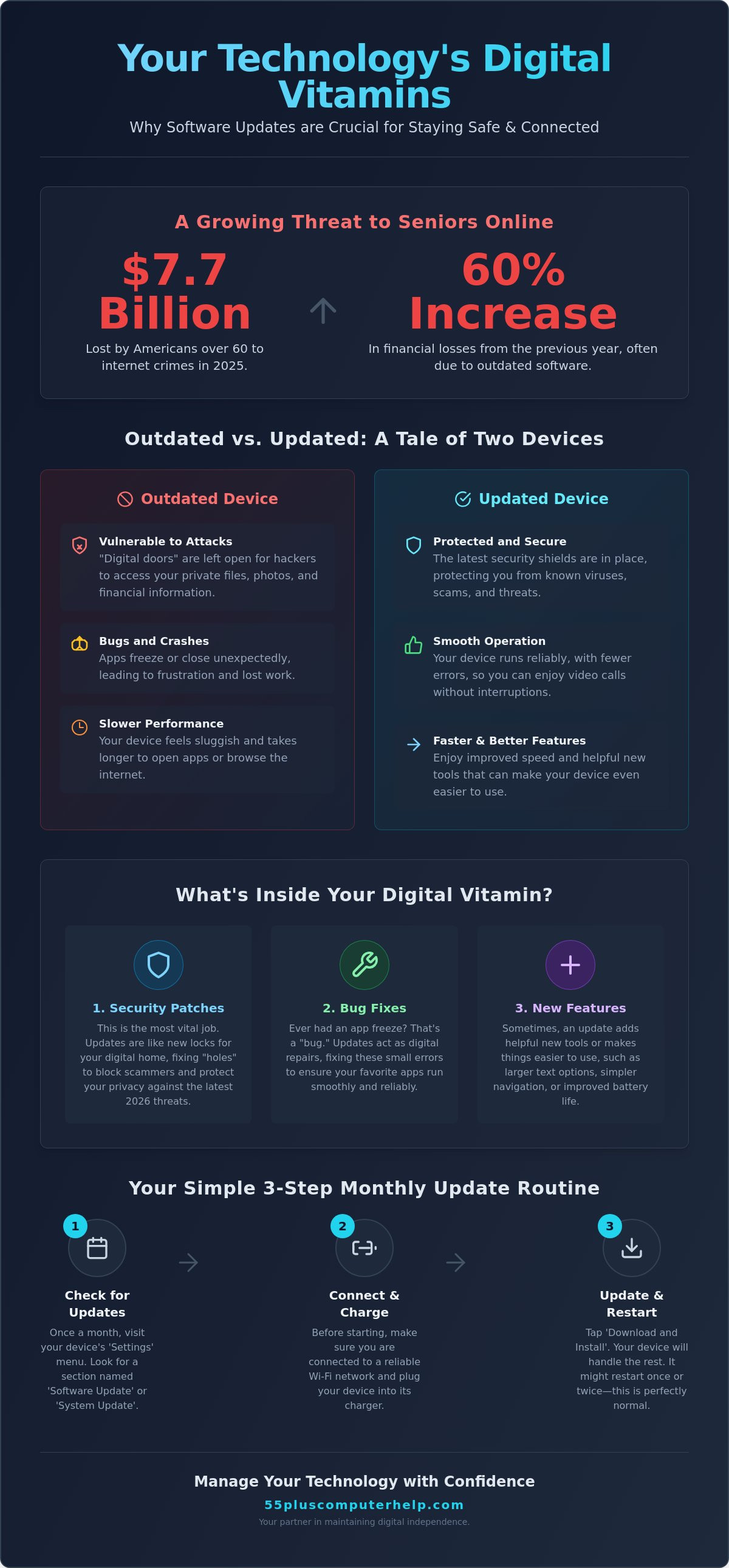
Did you know that in 2025, Americans over age 60 lost a staggering $7.7 billion to internet crimes? This was a 60 percent increase from the year before. It is a scary number, but it highlights exactly why software updates are important for seniors who want to stay safe online. Many of these crimes happen because older software has "holes" that hackers use to get into your personal files.
It is completely normal to feel a bit of anxiety when that "update available" notification pops up on your screen. You might worry that clicking it will change your favorite settings or make those familiar icons disappear. You just want your device to work smoothly so you can enjoy video calls with your family without any technical hiccups. We understand that tech moves fast, and it is easy to feel frustrated when your computer slows down.
This guide will show you how these updates act as "digital vitamins" for your technology. You will learn how simple clicks protect your privacy and improve your device's speed. We will also look at the latest 2026 security standards for your Apple and Android devices. By the end, you will feel confident managing your tech and maintaining your digital independence.
Key Takeaways
- Learn how software updates act as digital repairs that fix errors and keep your favorite apps running smoothly.
- Understand why software updates are important for seniors to protect sensitive information like passwords and family photos from online threats.
- Discover how these simple improvements can actually speed up your older devices and make them easier to navigate.
- Find out why keeping your technology current is a vital part of staying independent and connected to your loved ones in 2026.
- Get a simple three-step monthly routine to help you manage your device updates with confidence and peace of mind.
What Are Software Updates and Why Do They Keep Appearing?
It happens to everyone. You are in the middle of writing an email or looking at photos, and a little box pops up on your screen. It asks you to "Update Now" or "Remind Me Later." These messages can feel like a nuisance. You might even worry that clicking "Yes" will change your favorite settings or make your familiar icons disappear. We want to reassure you that these pop-ups are not there to bother you. They are actually a sign that your device is being looked after.
So, what is a software update? Think of it as a digital "patch" or a quick repair sent by the people who made your device. It is very similar to taking your car in for a routine tune-up. You don't wait for the engine to fail before you change the oil. Updates work the same way. They keep your tablet, phone, or computer running reliably for years to come. This is one of the main reasons why software updates are important for seniors who want to keep their technology in top shape.
You will usually see two different kinds of updates. An Operating System (OS) update is a major one. It affects the "brain" of your whole device, such as the recent iOS 26.5 for iPhones or Windows updates for your PC. An App update is smaller. It only changes one specific program, like your weather app or your email. Both are essential for a smooth experience.
The Three Main Jobs of a Software Update
- Security: This is the most vital job. Updates close "digital doors" that hackers try to use to get into your files.
- Bug Fixes: Have you ever had an app just close for no reason or "freeze" up? That is called a bug. Updates repair these small errors so your device stays stable.
- New Features: Sometimes, an update adds a helpful new tool. It might make the buttons larger or add a simpler way to start a video call with your family.
Why Updates Feel Constant in 2026
It might feel like you just finished one update and another appears immediately. In 2026, technology moves at a very fast pace. As new types of apps are invented, your device must adapt to stay compatible with them. Frequent updates mean the company is actively supporting your device. It shows they haven't forgotten about the older models.
You can often choose between "automatic" and "manual" updates. Automatic updates usually happen while you sleep, which saves you the trouble of clicking buttons. Manual updates wait for you to give permission. Both methods are safe. Learning how to manage these choices is a big part of why software updates are important for seniors who want to maintain their digital independence and stay connected with confidence.
Protecting Your Digital Home: The Security Benefits of Updating
Imagine your computer or tablet is your digital home. You keep your most private things there, such as family photos, banking details, and healthcare records. If you lost the key to your front door, you would change the locks immediately to stay safe. Software updates work just like that. They replace old, weak locks with new, strong ones. This is a primary reason why software updates are important for seniors who want to protect their privacy in 2026.
Hackers are constantly looking for "holes" in old software. These holes are like windows left unlocked. If you don't update your device, those windows stay open. Scammers use these openings to try and steal your personal information. In 2026, security standards for banking and medical apps are very strict. Many of these apps will not even run on older software versions because the risk is too high. Staying current helps you avoid the need for virus and malware removal services later on.
How Updates Stop Scammers and Identity Thieves
Think of an update as "patching" a small leak in a garden hose before it turns into a flood. This is what experts call patch management. When you install an update, you are fixing a specific problem before a scammer can find it. These updates also strengthen your email and web browser. They make it harder for "phishing" emails to trick you into giving away your password. A security patch acts as a digital shield that blocks known threats from entering your system. Improving your digital literacy for seniors starts with understanding how these shields work.
Is This Update Real? Avoiding the 'Fake Update' Scam
Scammers sometimes try to trick you with "fake" update messages. These often appear as bright, flashing boxes while you are browsing the internet. They might use scary language to tell you your computer is infected. This is called "scareware." Real updates are much more polite and quiet. Use this checklist to stay safe:
- Check your device "Settings" menu for updates rather than clicking a web link.
- Look for updates in the official App Store or Google Play Store.
- Ignore pop-ups that claim your "driver is out of date" or "system is slow."
Our best advice is simple. When in doubt, don't click. If a message seems suspicious, it is better to ask a trusted friend or a professional. If you feel overwhelmed by these messages, our team can help you with software installation and updates to ensure everything is set up correctly and safely.
Why Updates Make Your Devices Easier to Use
Many people worry that a new update will "break" their favorite tablet or make it harder to find their apps. It is a very common fear. You might think that if your computer is working fine today, there is no reason to change anything. However, the opposite is usually true. Updates are designed to make your technology more reliable and easier to navigate. This is a big reason why software updates are important for seniors who want a frustration-free experience.
Think of an update as a way to "tidy up" your device's internal files. Over time, digital clutter can build up and slow things down. This process is called performance optimization. An update can make an older iPad or laptop feel snappy and responsive again. It can even improve your battery life. Software creators often find better, more efficient ways for your device to use power. By installing these improvements, you might get an extra hour of screen time to browse the news or look at family photos.
It is true that a button might change color or move slightly after an update. We know this can be confusing at first. But the core functions of your device almost always stay the same. You will still send emails and take photos the same way you always have. These small visual changes are usually made to make the screen clearer and easier to read.
Fixing the Frustrating 'Bugs' and Glitches
A "bug" is just a simple mistake in the digital instructions that run your programs. These mistakes can cause an app to close unexpectedly or make your screen "freeze" right in the middle of a task. It is very annoying when this happens. Updates are the only way for the manufacturer to send you a repair kit for these glitches. When you see a notification for a version like the May 2026 Chrome 150 update, it often contains hundreds of tiny fixes. These repairs ensure that your computer stays stable and dependable.
Staying Compatible with Family and Friends
Technology needs to "talk" to other technology to work correctly. This is especially true for video call apps like Zoom or FaceTime. If your granddaughter has the latest version of an app on her phone and you are using a version from two years ago, you might have trouble connecting. You might experience dropped calls or blurry video. Keeping your apps current ensures you can always see those smiling faces clearly. Staying up to date is a key part of why software updates are important for seniors who want to stay active in their community and connected to their grandkids.
If you find the update process confusing, we can help. Our team offers smartphone and tablet training to show you exactly how to manage these changes with confidence.
Digital Literacy and Staying Connected in a Changing World
Literacy is about more than just reading books or writing letters. In 2026, it includes how you navigate the digital world on your tablet or phone. Experts often look at literacy rates and technology in education to see how different groups are learning. This topic isn't just for children in a classroom. It is for everyone who wants to stay sharp and active. Learning how to manage your device is a vital part of modern literacy. This understanding is another reason why software updates are important for seniors today.
When you stay digitally literate, you feel more connected to the world around you. High literacy rates among older adults are linked to better health outcomes and less social isolation. You can message your doctor with ease. You can join online hobby groups or attend a virtual religious service. Keeping your software current ensures these vital connections stay open and secure. It prevents the frustration of a "broken" link or a video app that won't open when you need it most.
Lifelong Learning in the Digital Age
Technology can feel like a brand new language. You don't have to become fluent overnight. It takes time and a little bit of patience. Think of each update notification as a small, helpful lesson. By clicking "update," you are learning how your device maintains its own health. Each version brings small improvements that make the screen easier to read or the buttons easier to tap. Keeping your software current also gives you access to the latest educational resources. You can visit virtual museums or take free online classes that only work on modern systems. Staying updated keeps your mind engaged and your tools ready for use.
How Technology Supports Senior Independence
There is a special kind of pride that comes with doing things yourself. You probably don't want to wait for a busy family member to visit just to fix a "frozen" screen or a slow app. Knowing how to manage your own updates gives you back your control. It means you don't have to "ask the kids" for help with every small technical glitch. You become the master of your own digital home. Maintaining your own tools builds confidence and keeps you independent. If you want to build these skills further, you can find more tips in our guide on computer help for seniors.
We believe that technology should be a source of joy, not stress. If you would like to master your device with a patient mentor, we offer personalized smartphone and tablet training to help you stay connected with confidence.
Mastering Your Technology with Confidence
Seeing an update notification on your screen is actually good news. It means the people who made your phone or tablet are still looking out for you. It shows that your device is healthy and supported. You don't need to be a tech expert to keep your system running well. Understanding why software updates are important for seniors helps you move from feeling overwhelmed to feeling in control of your digital life.
You don't have to check for these changes every day. A simple monthly routine is all you need to stay current. We suggest picking a familiar day, such as the first Monday of every month, to perform a quick digital check-up. This habit ensures you never fall too far behind. It also gives you peace of mind knowing your "digital locks" are strong and your apps are ready to connect with family.
A Simple Checklist for Safe Updating
Updating your device is a straightforward process when you follow these three steps:
- Step 1: Plug your device into power. Updates can use a lot of battery energy. You don't want the device to turn off in the middle of a download, so keep it plugged into the wall.
- Step 2: Connect to your home Wi-Fi. Your home network is much faster and more secure than the public Wi-Fi at a cafe or library. It ensures the update files download correctly.
- Step 3: Check your settings. On most devices, you simply go to Settings, then General, and then Software Update. Your screen will tell you if an update, like the recent May 2026 version 26.5, is waiting for you.
When to Call a Professional for Help
There are times when technology can be stubborn. If you see a spinning circle on your screen for more than an hour, the update might be stuck. This is a great time to call for a bit of backup. You might also want help during major transitions, such as moving to a completely new operating system. Asking for assistance isn't a sign that you lack ability. It is a sign of wisdom. You are choosing to save your time and avoid unnecessary frustration.
At 55 Plus Computer Help LLC, we act as your patient mentor. We can sit with you in your home and walk you through software installation and updates at your own pace. We want you to feel a sense of accomplishment every time you use your computer. If you feel stuck or just want a friendly expert by your side, you can contact 55 Plus Computer Help LLC for patient, in-home tech support. We are here to make sure you stay safe, connected, and independent.
Stay Secure and Connected with Confidence
Your technology should be a tool that brings you joy and keeps you close to the people you love. By keeping your software current, you are choosing to protect your private information and ensure your device works exactly when you need it. We have looked at how these simple steps prevent scams and keep your video calls running smoothly. This understanding is the key to why software updates are important for seniors who want to remain independent in our fast-moving world.
You don't have to manage these changes alone. Since 2014, our team has provided specialized, anxiety-free support for older adults. We offer patient, one-on-one training that respects your pace and focuses on your specific needs. Empower your digital life with patient, personalized tech support from 55 Plus Computer Help. We are here to make technology accessible and simple for you. You have the wisdom to master these tools, and we are honored to be your trusted partner on that journey.
Frequently Asked Questions
Will updating my computer delete my photos or documents?
No, a standard update does not delete your personal photos or documents. It only changes the underlying system files that run your computer. However, it is always a wise habit to have a current data backup before making any changes. This provides you with an extra layer of security and peace of mind, knowing your precious memories are safe no matter what.
Why does my computer seem slower immediately after an update?
Your computer is simply finishing some "housekeeping" tasks in the background. Immediately after an update, the system often needs to re-organize and index your files so you can find them quickly. This process can use extra power and make things feel a bit sluggish for an hour or two. Once it finishes this work, your device should return to its normal speed or even feel faster than before.
Is it safe to leave 'Automatic Updates' turned on?
Yes, leaving "Automatic Updates" turned on is a very safe and helpful choice. It allows your device to download and install the latest protections while you are sleeping. This ensures you never miss a critical security patch. You won't have to worry about clicking the wrong button or forgetting to check. It is one of the easiest ways to keep your digital home secure without any extra stress.
How long does a typical software update take to finish?
A typical update usually takes between 10 and 30 minutes to finish. Smaller app updates might only take a minute or two. Larger system changes, like a major Windows or Apple update, can take a bit longer. It is best to start these when you don't need to use your device for a while. Always make sure your device is plugged into power so the process isn't interrupted.
What should I do if my computer says it is 'no longer supported'?
This message means your device is getting older and the manufacturer will no longer send security patches. This is a major reason why software updates are important for seniors who want to stay safe. Without these updates, your device is more open to scammers. It might be time to look into a new computer setup that can handle the latest 2026 security standards. We can help you decide on the best next step.
Can a software update actually improve my battery life?
Yes, updates can definitely help your battery last longer. Software creators are always finding more efficient ways for your screen and apps to use power. They often include "energy-saving" code in their latest versions. By installing these improvements, you might find that your phone or tablet stays charged for a longer part of the day. It is a great benefit that makes your technology more reliable.
Do I need to update my smartphone as often as my computer?
You absolutely should update your smartphone just as often as your computer. Your phone likely contains very private things like your banking apps, email, and family photos. In 2026, mobile devices are a top target for scammers. Keeping your phone's software current is a vital part of your overall digital safety. It ensures that your mobile "locks" are just as strong as the ones on your laptop.
What happens if I just ignore the update notifications forever?
If you ignore updates, your device will slowly become less secure and less useful. Hackers look for people using old software because the "holes" are easy to find. Over time, your favorite apps like Zoom or your email might stop opening entirely. This is exactly why software updates are important for seniors who want to stay connected. Staying current ensures you can always reach your family and friends without technical failures.


