
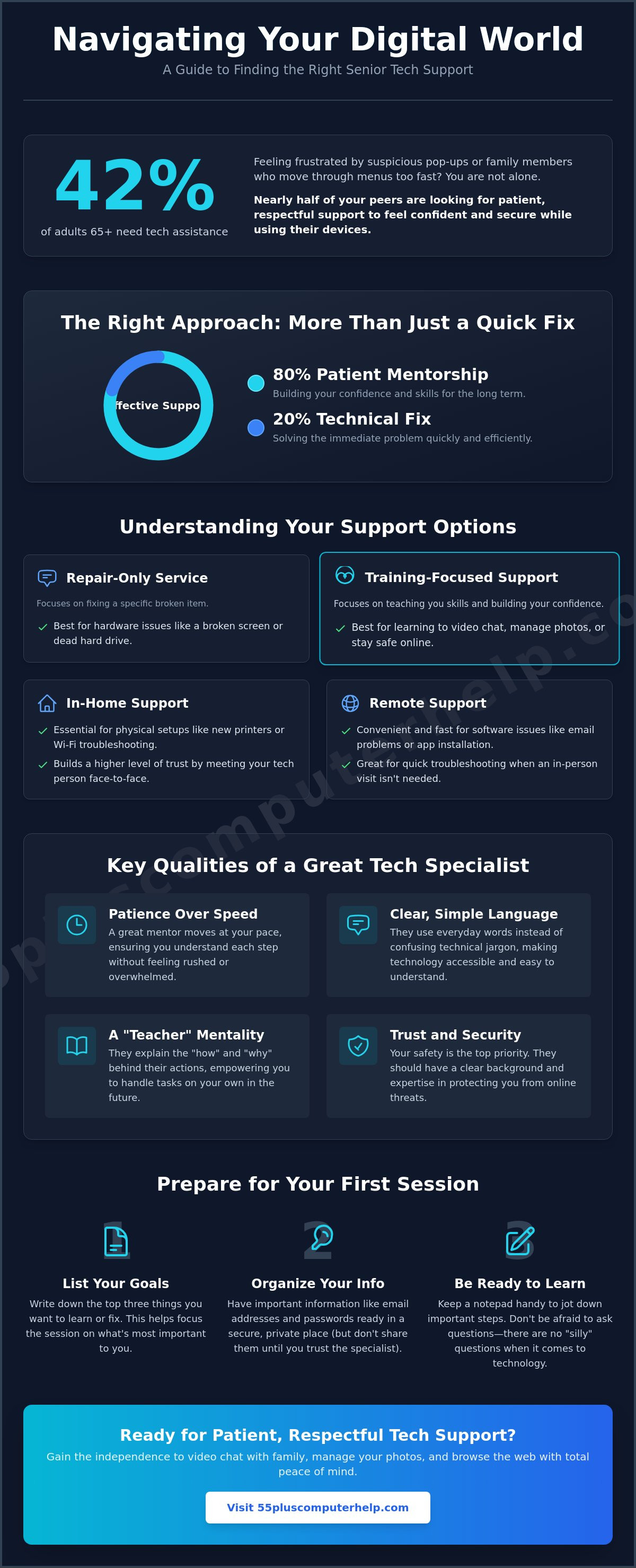
An estimated 42% of adults aged 65 and over report needing assistance with technology. This means nearly half of your peers feel the same frustration when a printer won't connect or a tablet screen goes dark. If you've been searching for senior computer help near me, you aren't alone in wanting support that actually respects your pace. It's exhausting to deal with suspicious pop-ups or family members who move through menus so fast your head spins. You deserve to feel confident and secure while using your devices, not left behind by a digital world that changes every day.
We believe that effective technology support is 20% technical fix and 80% patient mentorship. This guide will show you how to find a reliable tutor who offers clear explanations instead of confusing jargon. You'll learn how to vet a potential "tech person" to ensure they are trustworthy and respectful. We will also walk through the best ways to solve immediate problems like virus removal or email setup. By the end, you'll have the tools to gain the independence to video chat with family or browse the web with total peace of mind.
Key Takeaways
- Learn the difference between services that only fix a technical problem and specialists who provide training-focused support.
- Discover how searching for senior computer help near me can lead you to a patient mentor who uses plain language instead of confusing jargon.
- Identify the best way to vet a specialist by looking for reviews that specifically mention kindness and a calm teaching style.
- Find out how to prepare for your first session by organizing your passwords and creating a simple list of your top three goals.
- Understand the benefits of working with a service that specializes exclusively in the unique technology needs of adults aged 55 and older.
Understanding Your Options for Senior Computer Help
Finding the right assistance is the first step toward digital independence. When you search for senior computer help near me, you'll likely encounter several different types of services. It's helpful to understand the difference between "repair-only" support and "training-focused" support. A repair service focuses on fixing a broken screen or replacing a hard drive. In contrast, a training-focused specialist works with you to improve your digital literacy skills. This approach ensures you don't just get a quick fix, but you actually learn how to use your device with confidence.
A specialized focus on seniors is vital for effective learning. Most technical support is built for fast-paced business environments. Those technicians often use industry jargon that feels like a foreign language. Since 2020, the demand for tech support among older adults has grown by roughly 300%. This surge shows that more people are looking for a patient mentor rather than a faceless help desk. A dedicated specialist understands the unique challenges you face, such as avoiding online scams or managing a complex smart home setup. They take the time to explain the "why" behind each step so you feel empowered.
In-Home vs. Remote Support: Which Do You Need?
Remote support is a convenient option for software-related issues. If your email isn't sending or you need help installing a new app, a technician can often assist you through a secure screen-sharing session. This is fast and efficient for quick troubleshooting. However, some tasks require a physical presence. You can't set up a new printer or troubleshoot a weak Wi-Fi signal from a distance. In-home support is essential for these physical setups. It also allows you to work in your own environment where you feel most comfortable and secure. Seeing your teacher in person builds a level of trust that a voice on the phone cannot match.
Volunteer Programs vs. Professional Tutors
You might consider free volunteer programs offered by local libraries or community centers. These programs provide excellent social connection and help with basic questions. They're a good starting point if you just want to learn the basics of a smartphone. However, volunteer schedules can be inconsistent. Professional tutors offer a more reliable and expert-level service. They possess the deep knowledge needed for thorough virus removal or secure data backup. If your technical needs are complex or you want a long-term "tech person" to rely on, a professional service is often the best investment for your peace of mind and security.
Key Qualities to Look for in a Senior Tech Specialist
Searching for senior computer help near me often brings up technicians who prioritize speed over everything else. While a fast fix sounds good, technical speed is often the enemy of true learning. A specialist who rushes through menus leaves you feeling more confused than when you started. You need someone who values your comfort and moves at your pace. They should use everyday words instead of industry jargon. If a technician uses terms like "IP address" or "cache" without explaining them, they probably aren't the right fit for your needs. A personalized approach is also essential. Your goals are unique. You might want to learn how to video chat with family or organize years of digital photos. Your specialist should listen to what you want to achieve rather than following a generic checklist.
The Importance of a "Teacher Mentality"
A great specialist acts as a mentor. They don't just "fix" the problem and walk away. Instead, they explain the "how" and "why" behind each action. This approach helps you gain the confidence to handle the task yourself next time. You might find similar supportive environments in Senior Planet tech classes, which emphasize hands-on learning. Your personal tutor should encourage you to take notes or even record the session on your phone. If they seem annoyed by your questions, it's time to find a different provider. A good teacher knows that there are no "silly" questions regarding technology. Effective senior computer help near me focuses on empowerment. It transforms a frustrating experience into a sense of accomplishment.
Security and Trustworthiness Standards
Trust is the most important part of the relationship with your tech person. AI-powered scams and voice cloning are becoming more common in 2026. You need a specialist who prioritizes your safety above all else. They should have a clear background in virus and malware removal specifically for older adults. A reliable professional will never ask for your master passwords or sensitive banking information. They should also provide transparent, fixed-rate pricing. This is especially important because traditional in-home tech support can cost between $100 and $300 per visit. You deserve to know exactly what you are paying for without any hidden fees. If you're looking for a team that puts your security first, you can find patient technology support designed specifically for your needs.
How to Find and Vet Computer Help Near You
Finding local help requires a specific strategy. Don't just type "computer repair" into a search engine. That often leads to big retail stores that want to sell you new parts or expensive hardware repairs. Instead, search for senior computer help near me using words that describe the type of person you want to work with. Look for businesses that mention "patience" or "one-on-one training" on their website. These terms signal that the provider values the teaching process as much as the technical solution.
Reviews are a goldmine of information when you know what to look for. Don't just look at the star rating. Read the comments carefully to see how the technician treats their clients. Look for specific words like "kind," "understanding," or "patient." If a reviewer mentions that the technician "explained things simply" or "didn't make me feel silly," that's a great sign. You want a specialist who treats you like a neighbor. Avoid providers whose reviews only talk about how "fast" they were, as speed often comes at the expense of a good explanation.
It's also important to confirm their experience with the 55+ age group. A technician might be great at fixing a server for a big company, but they may lack the interpersonal skills to teach a beginner. Ask them how they handle frustration or what their teaching style is like during a brief phone call. You want someone who views themselves as a teacher first and a technician second. This distinction is what makes a session productive and stress-free. A true specialist will be happy to talk about their approach before you book an appointment.
Smart Search Terms for Better Results
Using the right phrases will save you time and help you avoid high-pressure retail shops. Try terms like "technology training for seniors" or "in-home tech support for elderly." These specific searches help you find local experts who prioritize personalized service. Look for businesses that offer a wide range of help, from smartphone training to Wi-Fi troubleshooting. This ensures they can grow with you as your technical needs change over time.
Questions to Ask During the First Call
A quick phone interview is the best way to gauge someone's communication style. Listen to their tone. Are they rushing you? Do they sound calm and welcoming? You should feel comfortable asking these specific questions:
- Do you have experience teaching people who are new to tablets or smartphones?
- What is your hourly rate, and do you have a minimum session time?
- Can you help me with my specific device, such as an iPad or a Windows laptop?
How to Prepare for Your First Tech Support Session
Preparation is the key to a successful session. Once you've found the right senior computer help near me, taking a few minutes to get ready will help you feel in control. It also ensures you get the most value for your time. Start by clearing a comfortable workspace. You and your tutor should be able to sit side-by-side. This arrangement makes it much easier to see the screen together. It allows the tutor to guide your hand or point to specific buttons without crowding your space. Having a dedicated notebook and pen nearby is also a great idea. You can write down the steps in your own words so you can repeat them later on your own.
Security is always a top priority. Gather your relevant passwords and login information before the session starts. Keep them in one secure place, like a physical address book or a private folder. You don't need to share these with your tutor, but you'll need them to log into your email or social media accounts while they guide you. This avoids the frustration of searching through old papers while the session is active. Being organized helps the conversation flow smoothly. It keeps your focus on learning rather than searching for lost scraps of paper.
Defining Your Goals
Think about what you want to achieve before the tutor arrives. It helps to decide if you want a "quick fix" or a "learning lesson" for each item on your list. For example, do you just want someone to fix your printer? Or would you prefer they show you how to print photos from your email yourself? Focusing on just one or two main tasks per hour ensures you don't feel overwhelmed. A "Priority List" of your top three goals keeps the session on track. This approach guarantees that the most important issues get solved first.
Gathering Your Digital Tools
Make sure your devices are ready for work. Ensure your laptop, tablet, or smartphone is fully charged. It's often best to keep them plugged into a power source during the session. You should also have your Wi-Fi password handy. Most people find this on a sticker on the back of their internet router. If you have any new devices in boxes, gather the cables and instruction manuals too. Having everything in one spot allows your specialist to provide the best in-home technology support without delays. This simple preparation turns a tech visit into a calm and productive learning experience.
Why 55 Plus Computer Help LLC is the Right Choice for You
Choosing a technology partner is a big decision that impacts your daily life. We specialize exclusively in technology support for adults aged 55 and older. We don't handle large corporate networks or physical hardware repairs. Instead, we focus on the devices that keep you connected to your friends and family. This niche dedication means we possess a specialized understanding of the specific hurdles you face. We know that technology can feel overwhelming at times. Our goal is to transform that frustration into a lasting sense of accomplishment.
Our focus is on empowerment and education. We don't just fix a problem and leave you wondering what happened. We want you to feel confident using your devices independently. This educational approach sets us apart from generic retail repair shops. We offer both onsite and remote support to fit your comfort level. If you need help with a physical setup like a printer, we can come to your home. For quick software questions, we can help you remotely. Our pricing is always transparent. You'll never deal with hidden fees or long-term contracts.
When you search for senior computer help near me, you deserve a service that respects your intelligence. We act as your advocate in an increasingly digital world. We help you sort through the noise of rapid industry changes. Our service providers possess both the technical skill and the interpersonal skills necessary to teach effectively. We are your local experts who are here to help you master your devices with patience and respect.
A Patient Mentor for Every Device
We act as a patient mentor for every device you own. Whether you need help with a smartphone, tablet, or laptop, we are here to guide you. Our tutors move at your pace. We never rush through the "hard parts" of a lesson. We understand that everyone learns differently. Some people like to take detailed notes, while others prefer to learn by doing. We adapt our teaching style to match your preferences. This personalized support helps you gain the independence to browse the web without fear.
Safe, Secure, and Professional
We prioritize your privacy in every session. We teach you how to stay safe online and how to spot suspicious activity. Our experts can help with email setup and troubleshooting to ensure you stay connected securely. We show you how to manage your digital life without giving away sensitive information. You can experience the peace of mind that comes with having a "tech person" you can actually trust. When you choose 55 Plus Computer Help LLC, you're choosing a partner who values your comfort as much as the technical solution.
Take Control of Your Technology Today
Technology doesn't have to be a source of frustration or anxiety. When you find the right senior computer help near me, you gain more than just a fixed device. You gain the confidence to explore the digital world on your own terms. We've discussed how prioritizing patience and clear communication makes a significant difference in your learning journey. A little preparation with your passwords and a simple priority list will ensure your first session is productive and stress-free. You deserve a tech person who treats you with the respect and kindness of a trusted neighbor.
Since 2014, our team has focused exclusively on empowering adults aged 55 and older. We provide the calm and respectful guidance you need to stay connected with your loved ones. Whether you prefer the personal touch of in-home visits or the speed of remote support, we are here to help you master your smartphone, tablet, or laptop. You can get patient, professional tech help today and start enjoying your technology again. You are fully capable of navigating the digital age with a steady mentor by your side.
Frequently Asked Questions
How much does senior computer help typically cost?
Costs for technology assistance vary based on your location and the complexity of the task. Some providers charge an hourly rate, while others offer fixed-rate pricing for specific services like virus removal or software installation. It is always best to ask for a clear price quote before you book an appointment. This ensures you can manage your budget without any hidden fees or surprises.
Can a computer tutor help me with my smartphone or tablet too?
Yes, a specialized technology tutor can help you master all of your personal devices. Many people who search for senior computer help near me also need assistance with their iPhones, iPads, or Android tablets. A patient mentor can show you how to download apps, adjust your font size, or video chat with your family. Learning to use these portable devices often makes staying connected much easier.
Is it safe to let a tech support person access my computer remotely?
Remote access is safe as long as you are working with a professional you have personally vetted. You should always be the one to initiate the session using secure, industry-standard software. A legitimate technician will explain what they are doing while you watch the screen in real-time. You can end the connection at any time if you feel uncomfortable. This method is a fast way to fix minor email issues or software glitches.
Do I need to buy a new computer, or can mine be fixed?
You might not need a new computer if your current device is simply running slowly due to old software or background programs. A specialist can often speed up your machine by performing virus removal and installing necessary updates. This can save you the cost of a new device. However, if your screen is cracked or your keyboard is physically broken, you would need a hardware repair shop instead.
What is the difference between computer repair and computer training?
Computer repair focuses on fixing physical parts that are broken or malfunctioning. Computer training is an educational experience where a tutor shows you how to use your software and devices. Training empowers you to perform tasks like sending emails or browsing the web safely on your own. Most seniors find that training-focused support is more valuable because it builds long-term confidence and digital independence.
How can I tell if a "tech support" phone call is actually a scam?
A legitimate technology company like Microsoft or Apple will never call you out of the blue to tell you your computer has a problem. If you receive an unexpected call or see a scary pop-up message with a phone number, it is almost certainly a scam. You should hang up immediately and never give these callers your banking info or remote access. Always reach out to a trusted local expert if you are worried about your security.
Can you help me set up a new printer or Wi-Fi router?
Yes, setting up new equipment is a core part of our service. Connecting a printer to your wireless network or ensuring your router provides a strong signal in every room can be a technical challenge. A specialist can visit your home to handle the physical setup and make sure everything is working correctly. They can also show you how to print from your tablet or smartphone so you can use your new tools immediately.
How many sessions will it take for me to learn how to use my computer?
The number of sessions depends entirely on your personal goals and your current comfort level. Many people feel a significant boost in their confidence after just one or two focused hours with a patient tutor. You might choose a single session to solve a specific problem or schedule recurring visits to learn new skills at your own pace. We ensure you never feel rushed or overwhelmed during the learning process.


